
1. Introduction
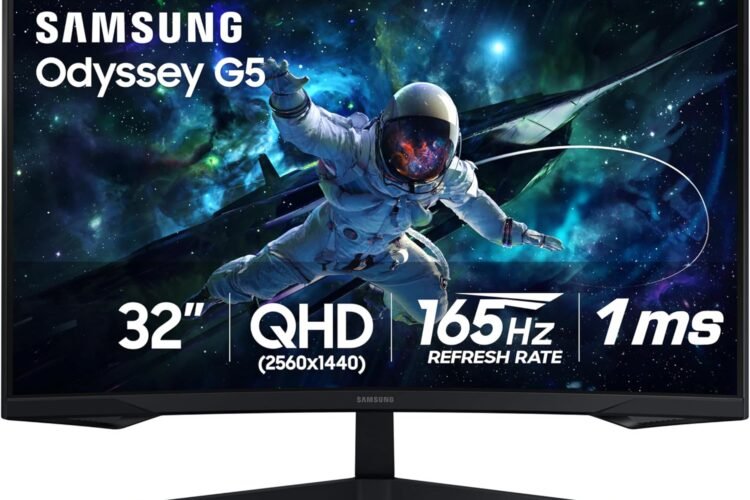
The Samsung 32-inch Odyssey G5 (model LS32CG550ENXZA) is a gaming monitor built for immersive gameplay. With a deep 1000R curved screen, high refresh rate, and fast response time, it’s designed to wrap you into the action and give you smooth, fast-paced visuals. Whether you play competitive esports or enjoy cinematic single-player games, this monitor delivers great value and performance.
2. Product Overview
- Model: Samsung Odyssey G5 32″ (LS32CG550ENXZA)
- Screen Size: 32 inches, curved (1000R)
- Panel Type: VA (Vertical Alignment)
- Resolution: QHD — 2560 × 1440 pixels
- Refresh Rate: 165 Hz
- Response Time: 1 ms (MPRT)
- Brightness: 300 cd/m²
- Contrast Ratio: 2500:1 (static)
- Tearing Prevention: AMD FreeSync
- HDR: Supports HDR10
- Viewing Angles: 178° horizontal / 178° vertical
- Ports: 1× HDMI 2.0, 1× DisplayPort 1.2
- Mount Compatibility: VESA 75 × 75
- Power Consumption: Maximum ~59 W
3. Design & Build Quality
The monitor features a strong 1000R curve, making the display feel very enveloping — especially for its 32″ size. The curved VA panel produces deep blacks and good contrast, which is great for both games and movies. The stand offers a slight tilt to help you find a comfortable viewing angle. Build feels sturdy, and the housing has a clean, modern gamer aesthetic.
4. Key Features & Capabilities
- 1000R Curvature: Provides one of the steepest curves on the market, increasing immersion and reducing eye strain by keeping more of the screen equidistant from your eyes.
- High Refresh Rate & Low Latency: 165 Hz refresh rate paired with a 1 ms MPRT response ensures fluid motion and minimal blur during fast-paced gameplay.
- FreeSync Support: Helps eliminate screen tearing when paired with compatible GPUs, creating a smoother gaming experience.
- HDR10: Offers enhanced contrast and color when viewing HDR content.
- Eye Comfort Features: Includes Eye Saver Mode and flicker-free technology, which are helpful for long gaming or work sessions.
- Curved VA Panel: Brings good contrast, making dark scenes richer — particularly useful for gaming in dim settings.
- Wide Connectivity: One HDMI and one DisplayPort make connecting to multiple devices (like a PC and console) straightforward.
5. Performance & Use Cases
- Gaming: Ideal for both competitive and casual gaming thanks to its high refresh rate and fast response time.
- Media & Entertainment: The curved screen and HDR10 support provide a cinematic viewing experience for movies and shows.
- Work / Productivity: The 32″ QHD resolution offers plenty of screen real estate for multitasking.
- Esports: Fast motion handling and FreeSync make it a good fit for responsive gameplay.
- Long Sessions: Eye comfort features make it more tolerable for extended gaming or work hours.
6. Pros & Cons
Pros:
- Immersive 1000R curved display
- High 165 Hz refresh rate
- Fast 1 ms response time
- Good contrast and deep blacks from the VA panel
- Supports FreeSync to reduce tearing
- HDR10 for richer visuals
- Eye comfort features
Cons:
- 32″ at 1440p might have a lower pixel density than smaller monitors
- VA panels can suffer from slower pixel transitions compared to IPS in some cases
- Only one HDMI and one DisplayPort (limits multi-device simultaneous usage)
- HDR brightness is moderate; not the brightest HDR monitor
7. User Feedback & Considerations
- Some users report that the 1000R curvature feels very immersive, but might be intense for certain setups or close viewing.
- There are occasional mentions of backlight bleed or panel uniformity issues — as with many VA curved panels.
- A few recommend ensuring your GPU can comfortably drive 2560 × 1440 at high refresh rates for best experience.
8. Tips for Getting the Most Out of It
- Sit at a proper distance (about an arm’s length) to fully benefit from the curved screen.
- Calibrate settings for your use case — e.g., boost contrast for gaming, reduce brightness for work.
- Use the DisplayPort connection whenever possible for the best frame rates.
- Enable eye comfort features like Eye Saver Mode for long sessions.
- Ensure your desk setup supports the monitor’s VESA mount if you plan to use a monitor arm.
9. Final Verdict
The Samsung Odyssey G5 32″ (LS32CG550ENXZA) is an excellent gaming monitor for those who want immersion and performance on a budget. Its 1000R curved VA panel, 165 Hz refresh rate, and 1 ms response time make it a strong contender for both serious and casual gamers. If you’re looking for a large, immersive display that doesn’t compromise on speed and features, this monitor is a smart pick.
👉 Product Link: